
How to Book Tee Times Online
At Drugan’s Castle Mound, we’ve made it easier than ever to book your tee times online.
Our new system with foreUP, allows you to quickly reserve tee times, manage your account, and stay updated on everything happening at the course, via text messages and emails.
Whether you’re a member or visiting us for the first time, this guide will walk you through everything you need to know.
Setting Up Your Account
Members
Getting started is simple. If you’re a member at Drugan’s, your account has already been created for you!
To finish setting it up, you’ll need to create your password.
Steps to finalize your account:
- Open the email with the subject line: “Drugan’s Castle Mound Country Club”
- Click the link to set your password
- Enter your new password and click “Reset”
- Log in using your email and password
Once that’s done, your account is ready to go.
Didn’t receive the email? You can still finish your account set up by going to the Login Portal and clicking “Forgot Password”.
Guests
If you’re not a member, you can quickly create your own FREE account to book tee times online and manage your reservations.
Booking Your tee Time
Booking your next round is quick and easy.
Steps to book a tee time:
- Log in to your account
- Select your preferred date and time
- Choose 9 or 18 Holes, number of players, and whether you’d like a cart
- Click “Book Time”
You’ll receive confirmation right away, and your tee time will be saved in your account.
To cancel a reserved tee time, click on “My account” at the top and select “Cancel”.
Need Help?
If you need help at any point, feel free to call us at 608-526-3225 and we’ll walk you through it.
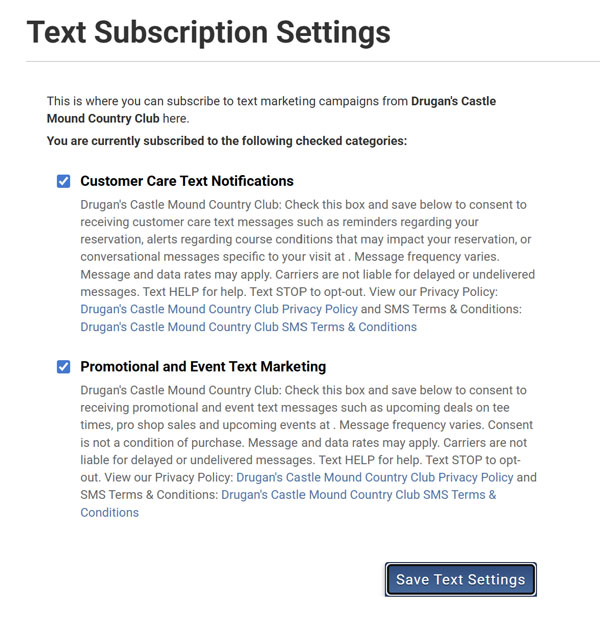
Get Updates via Text
Want updates from Drugan’s sent right to your phone? You can choose to receive text messages for:
- Tee time reminders and updates
- Course conditions
- Dining specials
- Events and promotions
To turn on text messages:
- Click “My Account”
- Go to “Email & Text Subscriptions”
- Check the boxes
- Click “Save Text Settings”
Ready to Book a Tee Time?
Book online or call the golf shop at 608-526-3225.


